
cci logo

Clipping Creations India

  • Home
  • Image Editing Services
    • Background Remove
    • Clipping Path Service
    • Multiple Clipping Path
    • Ghost Mannequin Effect
    • Car Photo Editing
    • Product Photo Editing
    • Image Masking
    • Drop Shadow
    • Color Correction
    • Photo Retouching
    • Vector services
    • Photo Editing
  • Blog
  • Pricing
  • Our Portfolio
  • Free Trial
Home  »  Tutorial   »   It’s Time to Mask FLAWLESSLY! Photoshop Masking Tutorial

It’s Time to Mask FLAWLESSLY! Photoshop Masking Tutorial

  • Clipping Creations India
  • June 21, 2022
  •  
    • Tutorial

In this post, I will demonstrate about Photoshop masking and will provide specially how to make a perfect Photoshop masking. This is the process of isolating objects in photos using erase or extract tools. The Photoshop is designed with plug-ins that makes it easier to carry out the masking process. The problem with this process is that it is time consuming and difficult to isolate images from their background. Isolating the object from the background is important since it allows the objects to remain transparent. Masking and alpha process makes it possible to isolate images of items such as glass or hair.

Photoshop masking process

The masking process method is appropriate when working on images that are difficult to determine whether they are part of the photo or the background. The process thus helps in removing the background based on the pixels available. This is the process that makes it possible to isolate a glass from the background. It helps in identifying the glass even when it is placed in different backgrounds. However, it is important to note that if you are photoshop masking an object, you can only return it when it is in a certain format.

Alpha channel

This is the alternative method one can use to isolate images from the background. The method is pixel based and the technique used is different from the masking method one. The method works on assumption that every image contains three or four combination of colors. There is red, green, and blue or a combination of cyan, magenta, yellow and black.

To isolate an object in an image using the Alpha Channel, an additional channel that takes the shape of the isolated object rather than the color may be used. This method is appropriate especially when you want to isolate objects that contain a lot of details or those that use different color combination. Alpha channel can be selected in InDesign just as it is with quark or Photoshop and is appropriate in isolating images using selections of contrast colors. In masking, one can place an image on a transparent background that can easily be uploaded.
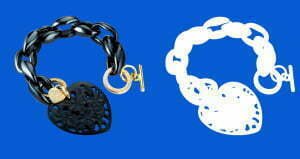
Things to avoid to create perfect Photoshop masking

If you want your Photoshop Clipping Path to be smart, there are a number of things you need to avoid. They include the use of the Magic Wand Tool that provide a shortcut but whose results are as bad as it is in all other quick fixes. Other than the bad results you get, it will take your time because you will have to spend more time fixing it. Similarly if you have areas of different colors, you may not easily get the desired results since the short cut will select a larger area than what you are really interested in. If the area you are working on is small, the magic Wand Tool may not give you the results you may be looking for. This is even complicated when the background has a wide range of colors.

Similarly, the tool may not give you better results if the background on which you want the work placed has many colors. That is why it is advisable to use Photoshop Clipping Paths for better image cut.

  • Facebook
  • Share on X
  • LinkedIn
  • WhatsApp
  • Email
  • Copy Link
(Visited 57 times, 1 visits today)

Post navigation

< Previous
Next >

Leave a Reply Cancel reply

Your email address will not be published. Required fields are marked *

Top Services:

  • Clipping Path Service
  • Car Image Editing Service
  • Ghost Mannequin Service
  • Product Photo Editing Service
  • Multiple Clipping Path Service
  • Ghost Mannequin Service
  • Color Change Service
  • Drop Shadow Service
  • Color Change Service
  • Photo Editing Service
  • Image Masking Service

Popular posts:

  • How to Move Eyes in Photoshop and Online ToolsHow to Move Eyes in Photoshop and Online Tools
  • How to Create See-Through Clothes in Photoshop: Easy…See Through Cloth in Photoshop − Best Practice
  • How to Clip in GIMP: Step-by-Step Guide to Clipping…Step-by-Step Guide to Clipping Mask & Image Editing
  • How to Reverse Video in Photoshop: Photoshop GuideHow to Reverse Video in Photoshop Photoshop Guide
  • How to Export Photoshop Actions in 2025How to export Photoshop actions
  • How to Create an Alpha Channel in Photoshop?How to Create an Alpha Channel
  • How To Fix A Lazy Eye In PhotoshopLazy Eye Problem Here’s What to Do,
  • How to Fix a Dark Polaroid Picture? Easy Solution to…How to Fix a Dark Polaroid Picture
  • 10 Professional Photo Manipulation Artists You Must Follow10 Professional Photo Manipulation Artists You Must Follow
  • How to Swap Eyes in Photoshop Like a ProHow to Swap Eyes in Photoshop

Recent Post

  • Mastering Flat Lay Clothing Photography: A Step-by-Step Guide
  • How to Use Clipping Path After Effects in 5 Easy Steps
  • Merge Photos with Graphics
  • 5 Must-Have Effective Photo Editing Tools
  • Ghost Mannequin Photo Editing Services: Complete Guide for E-commerce Brands

Categories

  • Background Removal
  • Clipping Path
  • Color Correction
  • Ghost Mannequin
  • Image Masking
  • Photo Editing
  • Photo Retouching
  • Tutorial
  • Vector Editing

About CCI

Clipping Creations India is a brand operated by Arafin Media. Here, every pixel tells a story. We offer our unparalleled service and invest our most talented minds at your solution whether you are a photographer or an agency. We are the gateway to exceptional photo editing services!

Get Your Quote

Quick Menu

  • About Us
  • Contact Us
  • Blog
  • Terms and Conditions
  • Privacy & Policy

Payment Method

  • PayPal
  • Stripe
  • Western Union
  • Skrill
  • Payoneer
  • Wise

Get In Touch

+8801715-491890

hello@clippingcreationsindia.com

Canada Office: 1401-2900 Carling Ave. Ottawa, ON, K2B 7J6

India Office: C-20, Lajpat Nagar 3, New Delhi, Delhi 110024, India

Bangladesh Office: 15 Bijoy Nagar, Abdur Rouf Tower (6th Floor), Dhaka – 1000, Bangladesh

Copyright © 2012 - 2026 Clipping Creations India | All rights reserved.

  • facebook
  • twitter
  • instagram
  • pinterest
  • linkedin

Live Chat